.png)


Our previous updates:
You have probably noticed that we haven't published our traditional “large” update articles in a while. There was a significant reason for this: we completely overhauled our development approach and shifted to a Continuous Delivery system. Instead of rare, massive releases, we experimented by seamlessly rolling out new features and improvements daily, right on the fly.
Behind the scenes, we performed a massive infrastructure upgrade: updating servers, significantly boosting the platform's speed, and streamlining development workflows. Now, we are ready to summarize this highly productive period. The main protagonist today is our completely new customer communication module.
💬 Meet: Chats (Live Chat Agent)
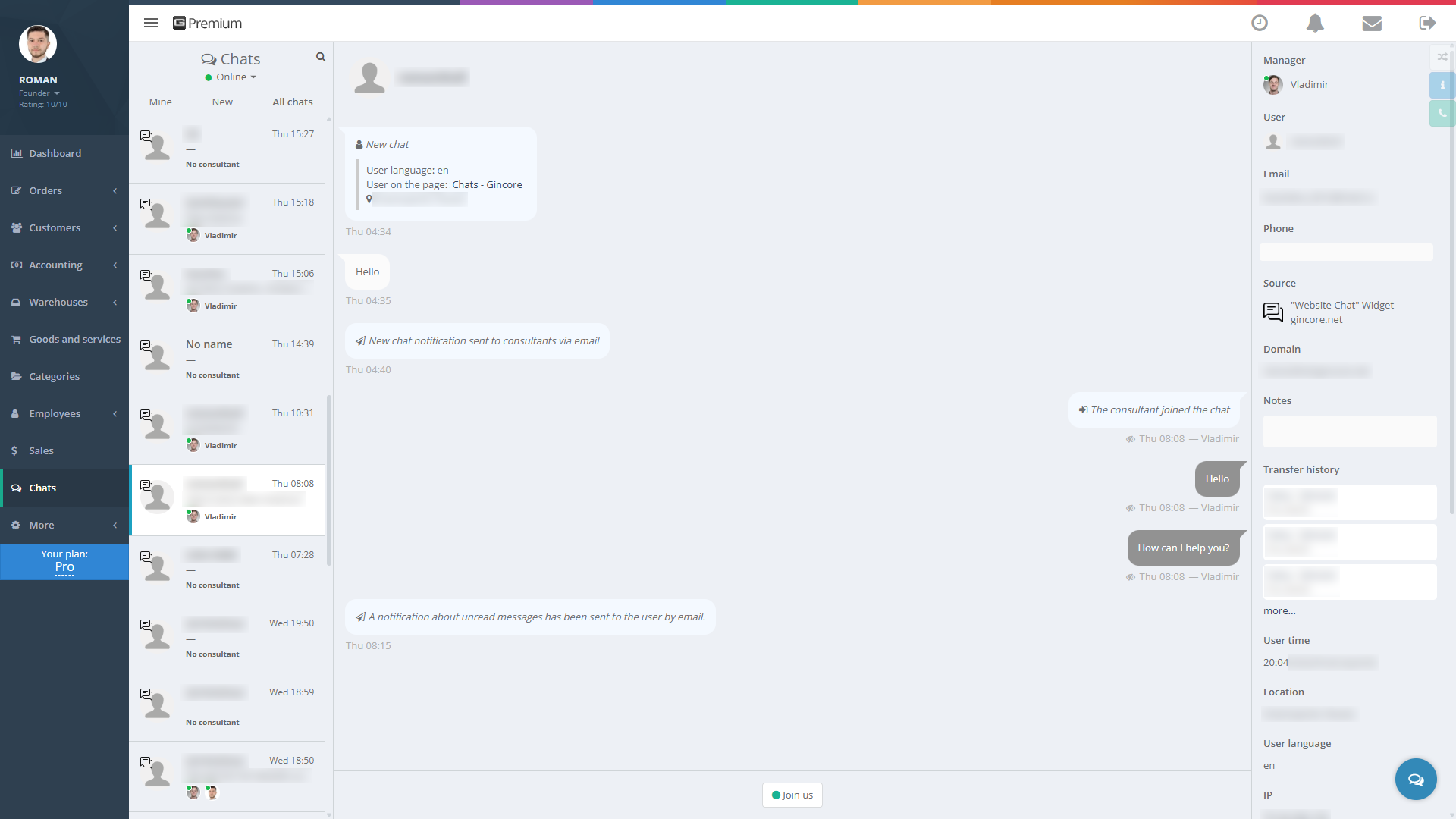
We are erasing the boundaries between you and your clients. Gincore now features a powerful Live Chat Agent functionality that brings all popular communication channels together in one window.
- All messengers in a unified interface: Your website, Telegram, WhatsApp, Viber, Instagram, and Facebook—your sales reps can now handle inquiries from all these platforms without switching tabs.
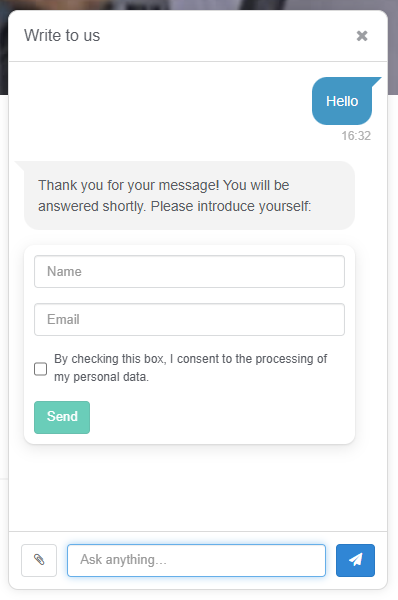
- Smart website widget: A proprietary, highly customizable widget. It automatically adapts the text language to the client's browser and gathers valuable analytics: visited pages, referral sources, geolocation, and local time.
- Team collaboration tools: Join colleagues' conversations, forward files, quote messages, and retain the entire communication context within the client's profile.
- Superpowers for managers: Added email and push notifications, message drafts, and a typing indicator. On the Pro plan, a “mind-reading” feature is available—you can see the text the client is typing before they even hit send!
- A glimpse into the future: We are already expanding the API and integrating AI responses to make communication even more automated.
🤖 Artificial Intelligence: Smarter and 3x Cheaper
We moved audio-to-text processing to our own server infrastructure. The result? Call transcription costs have dropped by 3 times! (During peak loads, the system seamlessly switches to external APIs at the previous rates).
But this is just the beginning. We are actively training AI to analyze calls: detecting conflicts (with instant notifications to management), assessing operator performance quality, and generating weekly personalized recommendations for employees.
Smart AI exclusions:
To ensure you don't waste AI credits, we've added flexible filters:
- In the client profile, you can disable AI call processing (perfect for employee numbers or regular suppliers).
- Global exclusion: You can turn off AI for outgoing calls to clients who already have an active order (use with caution so you don't miss crucial details regarding ongoing repairs).
📦 Inventory and Procurement Management
- Multi-import of stock balances: Uploading your database is now effortless. In a single import file, you can now specify multiple different suppliers, various warehouses/locations, and invoice numbers. One click, and a complex receiving process is completed.
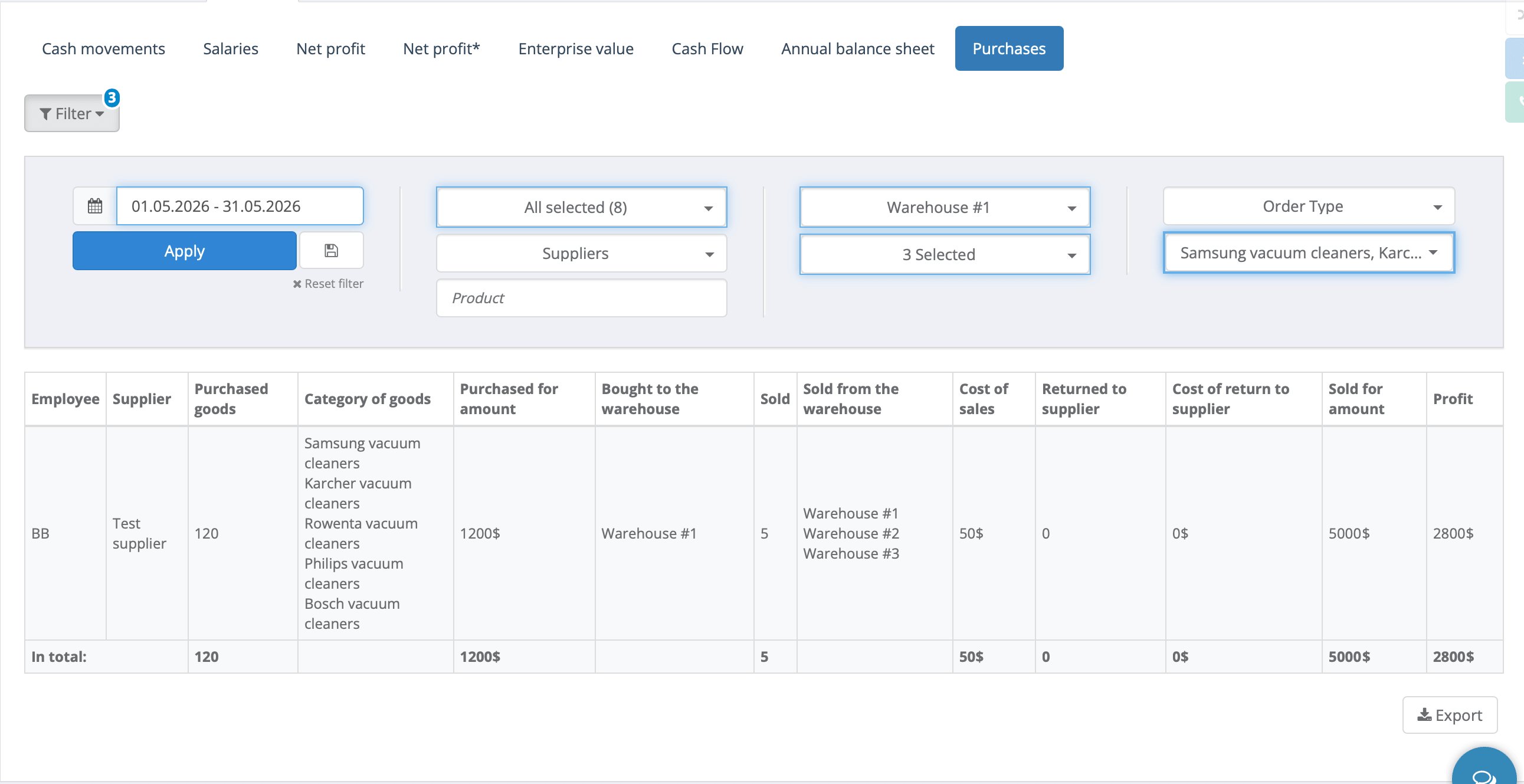
- Upgraded procurement report: Added three crucial filters. You can now analyze purchases by specific product category, by order type (how the item was utilized—via sale, repair, or production), and by warehouse (where it arrived and left).
- Purchasing manager filter: In inventory balances, you can easily see which items are on the shelves thanks to a specific purchasing manager.
- Informative labels: A “Note from supplier order” variable has been added to the serial number label template. If a part is bought as a “donor,” the warehouse worker will see this directly on the barcode without opening the database.
- Smart serial number entry: When receiving goods, fields for entering serial numbers only appear for items where this tracking is actually enabled (checked).

💼 Orders, Finance, and Security
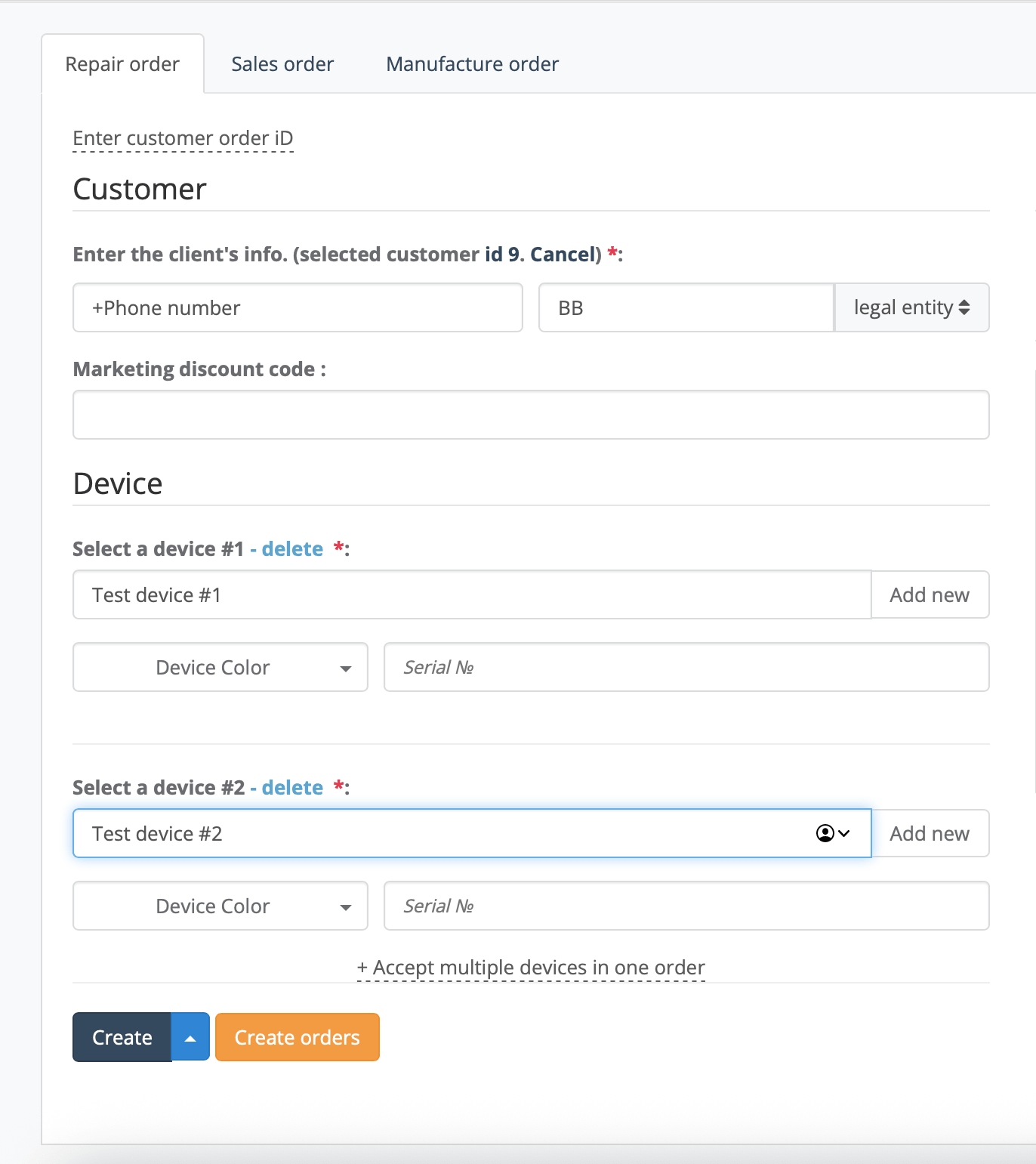
- Accepting multiple items: single order or separately. We have expanded the capabilities for working with bulk/B2B clients. Previously, you could accept multiple items into one combined order—convenient if you need to issue the entire batch (e.g., cartridges) at once. But what if the client wants to pick up their items as soon as each one is ready? Now you can accept multiple items from one client into separate orders at once (in just one click). This gives you complete freedom: you can distribute these tasks across different workshop branches and, most importantly, hand them over piece by piece as they are ready, without waiting for the rest of the batch to be finished.
- Real picture in the turnover report: Previously, the “Order price” column only showed the actually paid amount (prepayment). We have now added a “Total order value” column so you can see the full financial picture regardless of current payments. Purchaser and supplier names have also been added to the report.
- Reminder control: We brought order to tasks. Users can now freely delete their own (outdated) reminders. Other people's reminders can only be deleted by their author or the head manager (Founder).
- Document printing log: The live order feed now records every click of the “Print” button. You will always know if a certificate or receipt was printed for a specific order, exactly who did it, and when.
- Profile security: Added strict system logging for any changes to user logins and passwords.
🛠 Bug Fixes and Interface Improvements
We tracked down and fixed numerous minor flaws to make your Gincore experience flawless:
Finance and Cash Register
- Fixed a bug where a sales discount of an exact amount (e.g., 100 UAH) could be applied as a 100% discount.
- When accepting mixed payments, the name of the fiscal cash register and cashless account is displayed correctly.
- Resolved a CheckBox integration error where the receipt link was not sent via SMS.
- Fixed the payment flow: when paying to the online cash register with an SMS receipt and clicking “Deposit and issue,” the order status now correctly changes to “Issued.”
- Fixed errors in calculating technicians' salaries (gross profit and service percentage) under the new method for the “Order paid and issued” event.
- Exporting the payroll report no longer opens a blank page.
- Restored the functionality of the “Group” checkbox in accounting transactions.
Orders and Inventory
- System robots (Chatbot and Sales Site) no longer appear in the “Manager” and “Technician” dropdown lists.
- Mass unlinking of a serial number in a closed order is now accompanied by a clear informational message rather than being silently ignored.
- During bulk receiving from the cart, the default purchase price (instead of retail price) is now substituted correctly.
- The mass status change window for repairs now correctly displays repair statuses instead of sales statuses.
- The link for quick navigation to the supplier order is clickable again in the product name card.
- Clicking on a product in the order addition history now correctly opens its card without errors.
Interface and Usability
- Saved filters no longer reset when navigating between menu sections. The "cross" button for resetting a filter works correctly again.
- Fixed the operator filter in the “Calls” section (previously caused a session error).
- Adapted the mass order editing window in the mobile version—buttons no longer extend beyond the screen edges.
- Restored the missing “Status” column header in the mobile version of repairs.
- Fixed filter checkboxes (Courier, Pickup, etc.) that would clear upon page reload.
- Fixed the creation of a new branch via the order creation setup form.
- Access rights settings for custom repair statuses and warehouses are now saved correctly in the employee profile.
- In the notification panel (envelope icon), read messages now visually change color.
- Resolved an issue where files exported from the system (e.g., procurement report) wouldn't open or caused an Excel error.
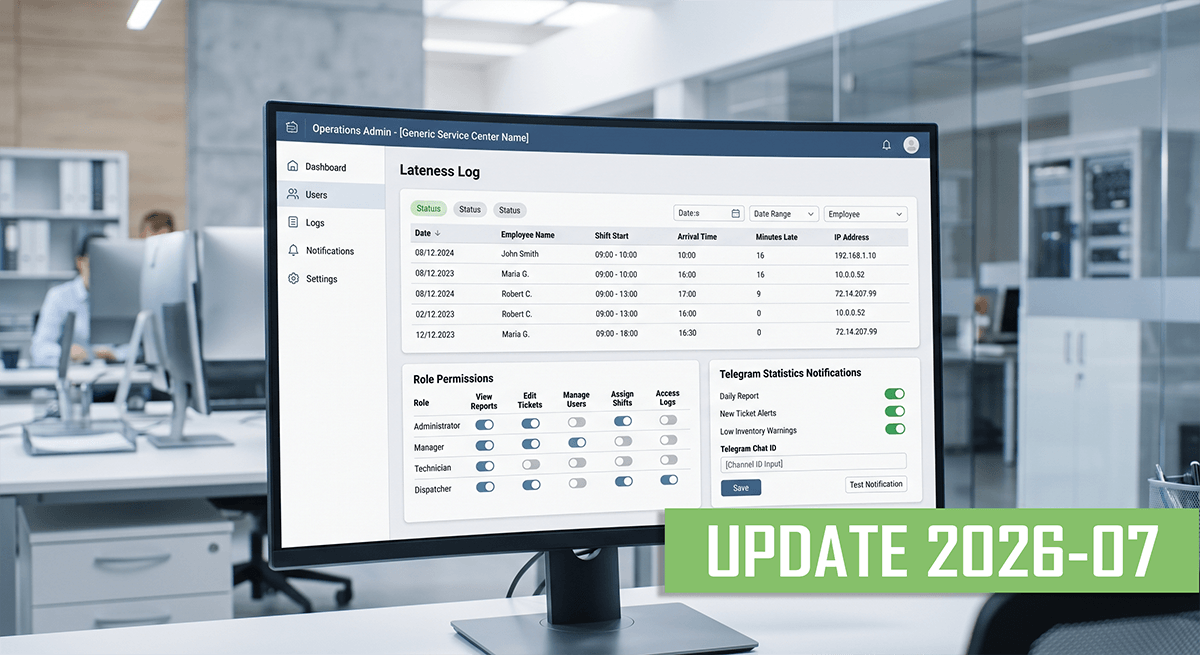
Check out the next update 2026-07. Flexible printing, purchasing report and Telegram statistics.