.png)


In the July Gincore update, we added AI privacy settings with local processing on Gincore servers. We also improved document printing in orders, the purchasing report, employee permissions, the lateness log and Telegram notifications, and fixed issues in warehouses, chats, movement history and repair order type settings.
Our previous updates:
Main update: in ⚙️ More - Settings - AI (Beta), users can now choose the AI processing mode: external AI services, local AI on Gincore servers or hybrid mode, where local processing has priority.
AI privacy settings: local processing on Gincore servers
We added a local LLM model — local AI in beta mode. AI tasks can now be processed at a lower cost and locally on Gincore servers, without sending data to external APIs of leading AI companies.
This matters for teams that pay close attention to data privacy: when local processing is selected, data stays inside Gincore’s infrastructure. Processing with the local model costs less than the mini model, while the processing quality, based on our extended testing, remains acceptable and does not fall behind standard models.
The setting is available in ⚙️ More - Settings - AI (Beta) in the AI processing mode field. Three modes are available:
- External AI services — the previous processing mode through external AI services;
- Local AI — processing is performed only locally. If the local service is unavailable, processing will not be completed after several attempts, and data remains only on Gincore servers;
- Hybrid mode — the default mode. Local AI is used first, and if processing does not succeed after several attempts, the system uses the external AI models selected below in the settings. Model prices are available in the relevant contextual help section.
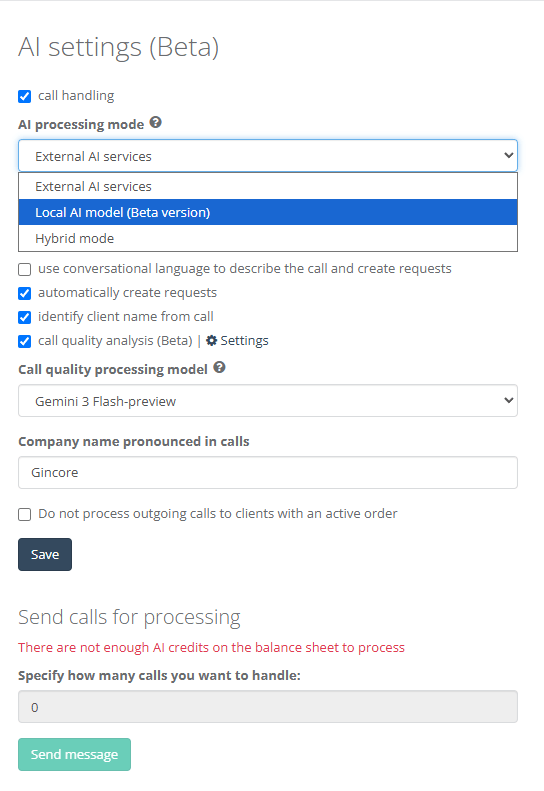
Please note: after alpha testing, local AI has moved to beta mode. During peak hours, tasks may be queued, so processing delays may increase. If you need faster processing, choose External AI services, provided that you agree and have informed your clients that the recording will be processed by the relevant AI companies, including OpenAI, Google and X.ai.
AI and bonus credits
In test mode, we will also add bonus AI credits to some tariff plans. These bonuses are valid for 30 days only and do not carry over to the next period. Bonus credits can be used only for the local model.
Because the service is in beta testing, it may be paused for any duration and at any moment without prior notice. If a tariff is paid early, the unused balance will be transferred to the new paid tariff in proportion to the full unused days.
Print events in the order live feed can now be configured
A new option in print template settings lets users choose whether a document printing event should appear in the order live feed.
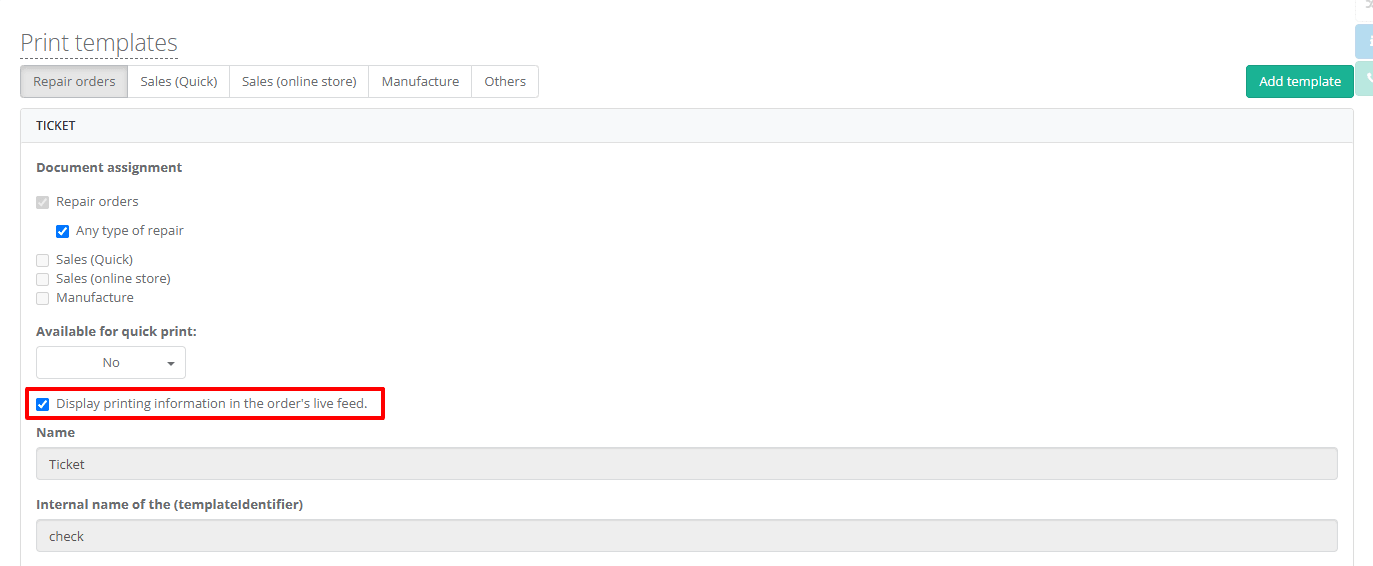
Previously, when a user sent a document to print, Gincore automatically added this event to the live feed: who sent the document, when it happened and which document was printed. This level of detail is useful for some teams, but for others it made it harder to scan the most important order events.
Now an administrator can decide whether the print event should be recorded in the order history. This keeps the live feed informative without overloading it with technical actions that are not needed in daily work.
A more flexible purchasing report
We expanded the product purchasing report. It can now be generated without selecting the responsible employee for purchased items. Previously, the report required selecting the employee who created the purchase order.
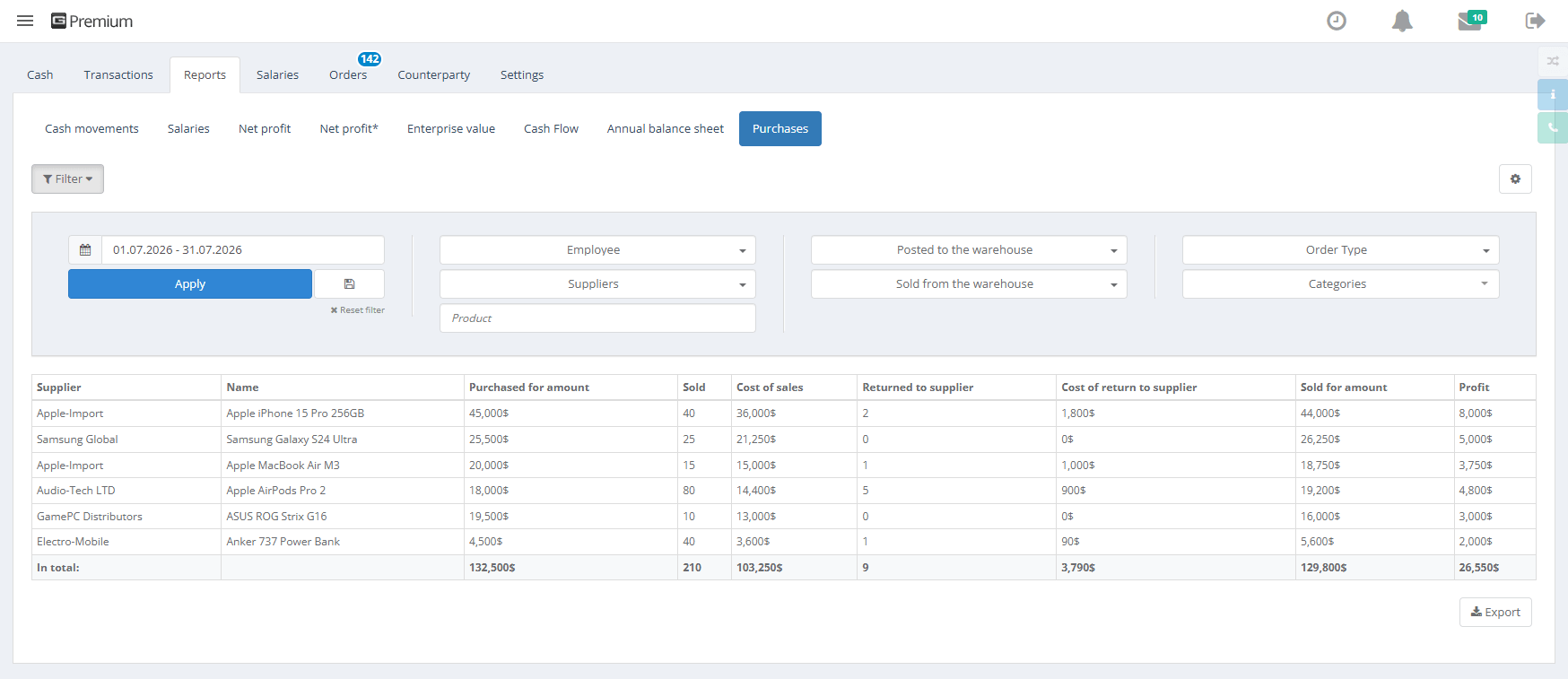
We also added table display settings: users can choose which report items and columns should be shown and which can be hidden. This makes it easier to prepare the report for a specific task, such as purchase analysis, supplier checks, amount control or work with product positions.
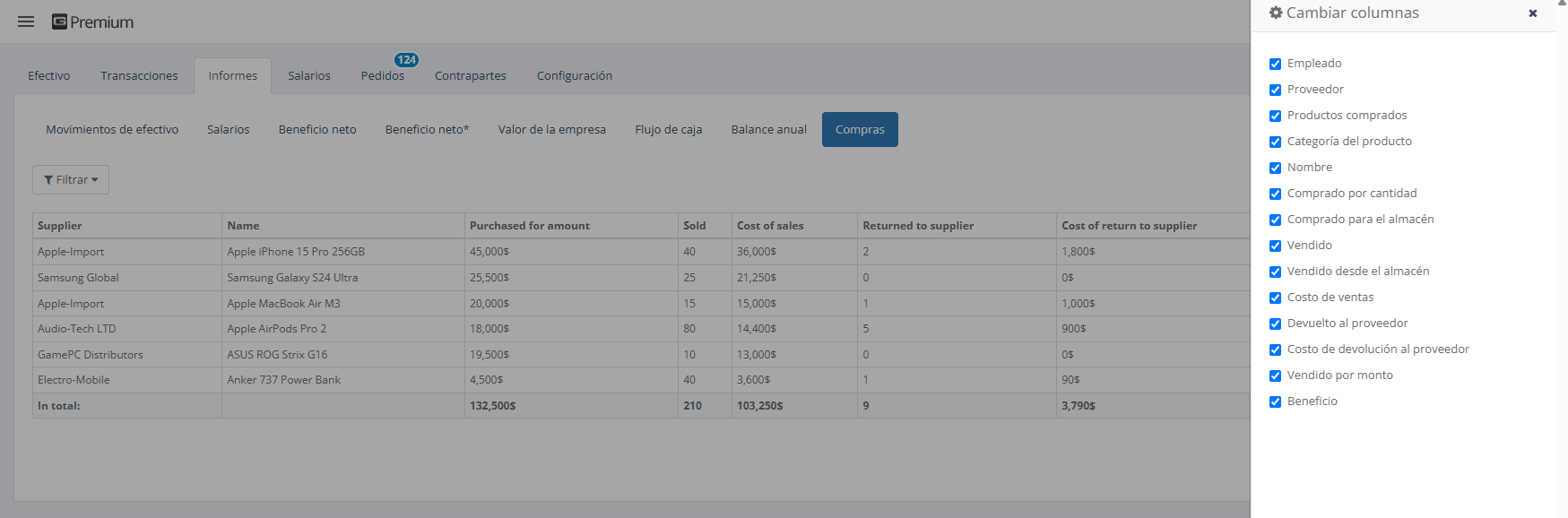
The report now includes product name and quantity. Previously, it showed which supplier the purchase came from, the amount and the product category, but did not show the exact product or quantity. Now purchases can be analyzed in more detail: teams can see what was purchased and in what volume.
Access rights: creating products without viewing rights
In Employees/List of roles, we changed the permission logic for products. Previously, if an administrator disabled View product position, the system also automatically disabled Create product/part. This limited role configuration flexibility.
Now these permissions can work independently. If an employee cannot view products but is allowed to create them, they will not have access to the general Products menu and will not be able to view product cards. However, they will still be able to quickly create new products with the + button directly in orders.
This scenario is useful when an employee needs to add new positions while processing an order but does not need to open the full product catalog or view existing product cards.
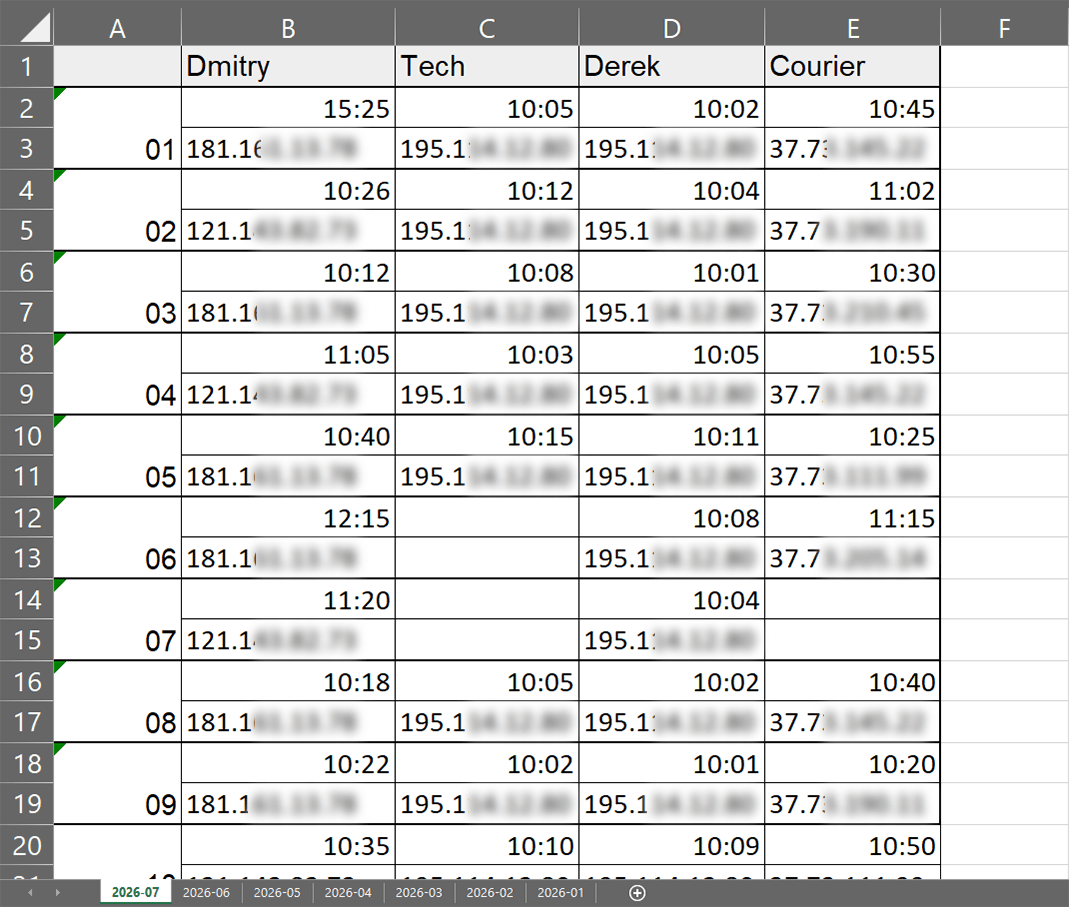
The lateness log now shows the IP address
We changed the Lateness log table file. It now shows not only the time when a user logged in to the program, but also the IP address used for that login.
This helps managers and administrators analyze employee logins more accurately and understand which IP addresses were used to access Gincore.
Telegram statistics and mailing time settings
We improved the Telegram bot logic and statistics mailing time settings.
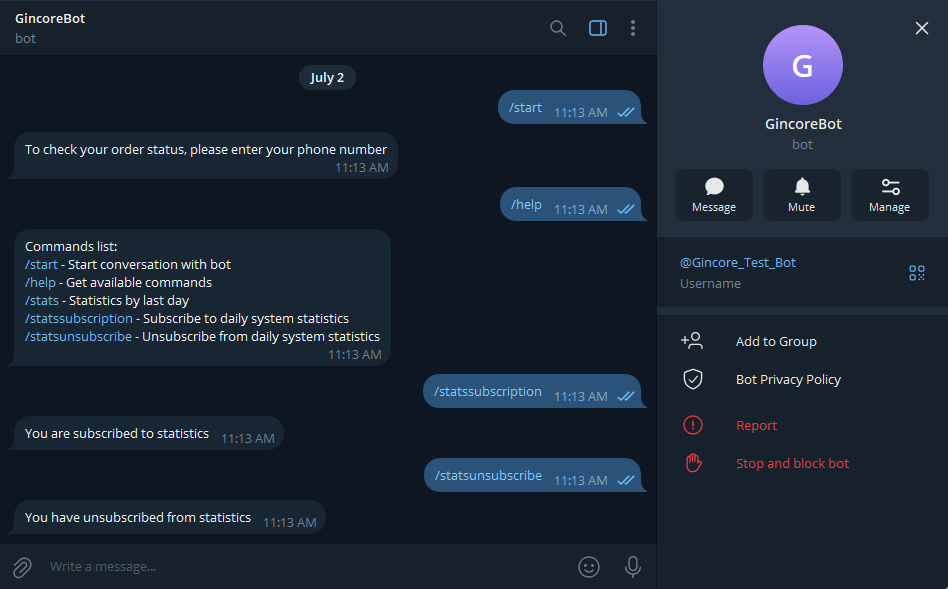
Previously, the /unsubscribe command unsubscribed a user from all system notifications, not only from daily statistics. The /unsubscribe command has now been removed. If a user wants to stop receiving all notifications, they only need to stop the bot.
A separate command has been added for daily statistics:
- /statssubscription — subscribe to daily system statistics;
- /statsunsubscribe — unsubscribe from daily system statistics.
This lets users turn off statistics only while keeping important system notifications.
We also changed the Send statistics at field in Telegram settings. Previously, the interface allowed selecting an exact time with minutes, such as 11:25, but after saving, the system reset the value to a full hour, such as 11:00. Minute selection has now been removed, and the setting matches the system logic: statistics are sent strictly by full hours.
Fixes
Invoice printing in receipts
In Warehouses/Receipts, when users selected invoices with checkboxes and launched invoice printing through bulk actions, they were redirected to the main page. The same action worked correctly in Orders/Supplier orders. Invoice printing from receipts now works correctly.
Opening a product card from movement history
In Warehouses/Movements/Movement history, an error occurred when users tried to open a product card by serial number from the Product/Order column in a new browser tab. Product cards now open correctly.
Line breaks in chat messages
In Chats, long messages with paragraphs lost line breaks after sending, and the text merged into one block. Sent messages now keep their original formatting, and line breaks are shown exactly as the user entered them.
Warehouses with movement history are protected from deletion
We fixed warehouse deletion logic. Previously, the system could allow deleting an empty warehouse even if it had previously been used in internal product movements. Deleting such a warehouse also removed the related movement history.
Now a warehouse cannot be deleted if it has ever participated in product movement operations. This helps preserve data integrity and the history of warehouse operations.
Counterparty in the repair order type list
In More/Settings, under Repair order type, the linked counterparty name was not displayed in the list of created repair types. The counterparty was visible inside the repair type card, but not in the general list. The linked counterparty name now appears in the repair type list.
Try the updated Gincore features
If you already use Gincore, use these changes to configure the order feed, reports, employee roles and notifications more precisely. If you are choosing a system for a service or repair center, sign up and see how Gincore helps manage orders, warehouses, purchasing and communication in one system.